Zscaler ThreatLabz posted a write-up on a targeted campaign against government entities in the Middle East that leans on a Telegram-C2 sideloader called TELESHIM. I read it, thought “that looks like a clean, self-contained candidate for a reverse-engineering walkthrough” — everything interesting is inside a single DLL, nothing needs to run — and asked around for a sample. It came to me from Olivier Ferrand, who packed it into a password-protected 7z for transit (the usual security instinct: don’t hand a live Telegram-C2 DLL around bare). Credits where they’re due.
The 7z is transport, the DLL is the malware. The file inside the archive arrived with a 64-hex-character name and no extension — its own SHA-256, standing in for a filename. To keep my head straight I renamed the outer archive to taleshim.7z before opening it; the DLL still carries its hash-name as we walk through it. That DLL goes to some effort to pass itself off as an ASUS task-scheduler helper, and rather less effort to hide the fact that it talks to api.telegram.org for everything else. Someone decided that if the transport had to be free, unblocked in most corporate networks, and could carry files up to two gigabytes, they were going to send their C2 through Telegram. So here we are.
This walkthrough is meant as a beginner-friendly static analysis: you never execute anything, you follow the same keyboard shortcuts I do in Malcat, and every step lists the address you should be looking at. If you have never opened a disassembler in your life, this is a comfortable place to start; if you have, feel free to skim. Zscaler covers a lot more ground than I do here (MAC-address-gated commands, victim-specific volume-serial keying for the next-stage payload, campaign attribution) — this post stops at the point where the config falls out of .rdata.
0. TL;DR
The sample is a 32-bit Windows DLL that impersonates the ASUS system component AsTaskSched.dll. It is a backdoor that
- starts through DLL sideloading, using a legitimately signed host EXE (
shimgen.exe) as its launcher, - carries its configuration encrypted inside the binary as a base64 blob wrapped around a circular XOR,
- uses Telegram’s bot API (
api.telegram.org) as its command-and-control channel, - fingerprints the infected host by its MAC address,
- and pushes back against static analysis with mixed boolean arithmetic, in-place string decryption, and import-by-hash.
The rest of the post is the walk from a fresh Malcat window to that summary.
1. Opening the Transit Archive — the Summary View
Drag the 7z into Malcat. This is not the malware — the archive is only the way I received the sample — but it is a useful first stop: it verifies the hash before we touch anything else, and it shows off Malcat’s Summary View, the page it drops you on after any initial parse. For triage the summary is the single most valuable panel in the tool: file type, size, hashes, sections, YARA hits, and the anomalies list all live on this one screen. Get into the habit of reading it top to bottom before doing anything else.
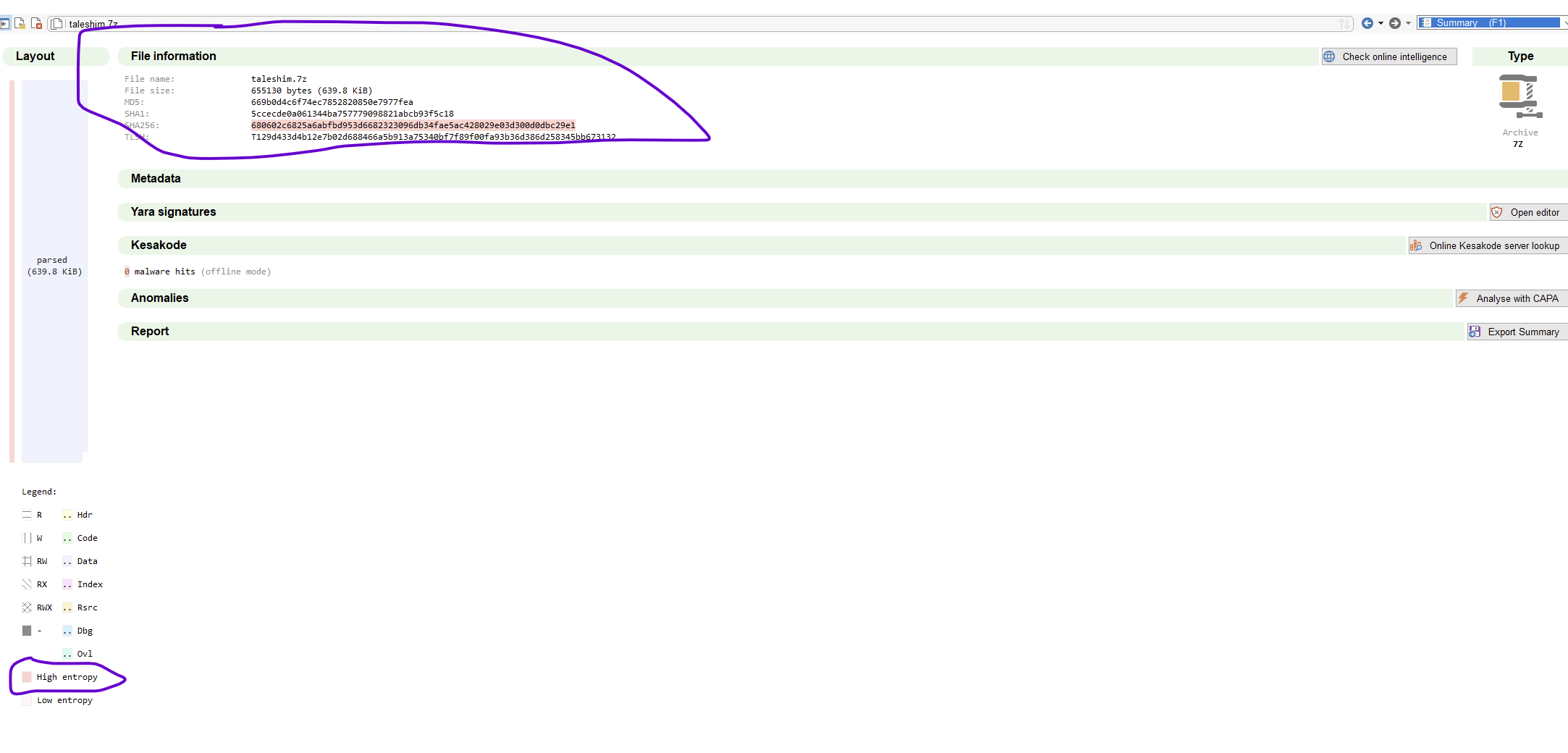
For the archive:
| Field | Value |
|---|---|
| Type | 7Z |
| Size | 655,130 bytes |
| SHA-256 | 680602c6825a6abfbd953d6682323096db34fae5ac428029e03d300d0dbc29e1 |
Down the right edge of the hex pane there is a slim entropy strip. For an archive it is uniformly hot — compressed data looks a lot like random data, which is exactly what you would expect for a 7z. High entropy on an archive is not a finding, it is a feature. Come back to that strip later when the DLL is in front of you and it will earn its keep.
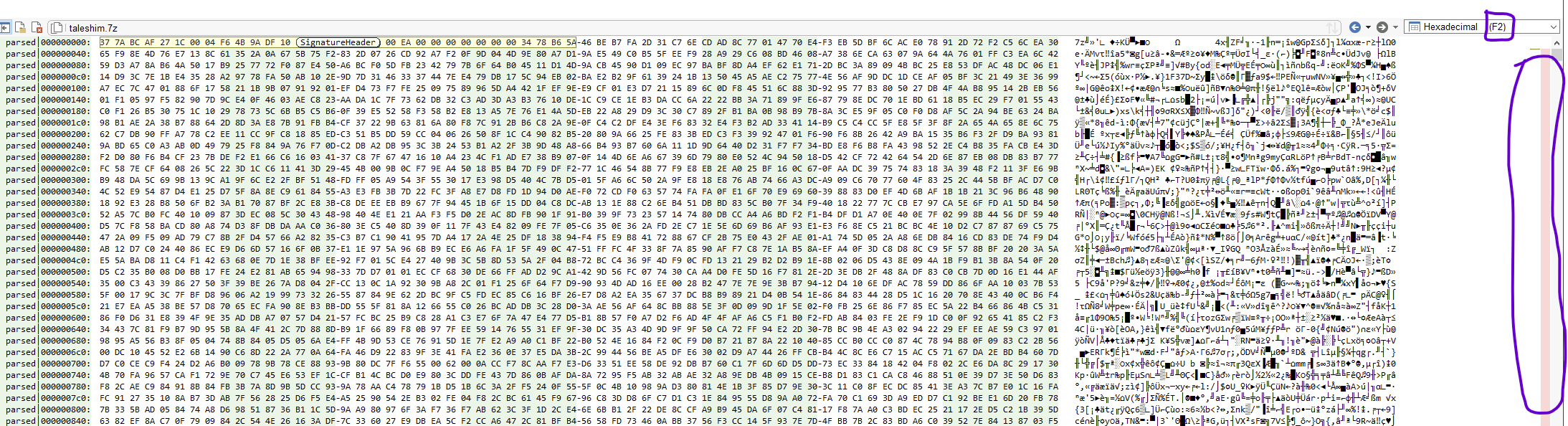
Shortcut:
F2toggles into the hex view, and the entropy strip on the right becomes your fastest “is anything here packed or encrypted” radar — dark cells mean structured data, bright cells mean high entropy.
2. Peeking Inside the Archive
A 7z is a wrapper — in this case the wrapper my sample source used to hand the DLL over, not something the malware itself puts on the wire. Malcat can look through wrappers like this without you having to extract anything to disk, even when the archive is password-protected with the classic infected; the contents show up as Virtual Files. For a PE those virtual files might be resources, for an archive they are its members.
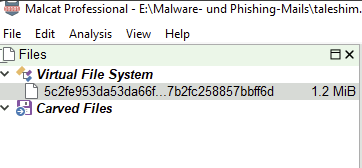
There is exactly one file inside and its name is a hash:
5c2fe953da53da66fbcbb3be0fd6b63907c10714c337f287b2fc258857bbff6d (1,271,296 bytes)
Double-click, and Malcat treats the extracted content as a fresh analysis in its own tab. That gives you:
| Field | Value |
|---|---|
| Type | PE (Windows executable) |
| Architecture | x86 (32-bit) |
| Export module | AsTaskSched.dll |
| SHA-256 | 5c2fe953da53da66fbcbb3be0fd6b63907c10714c337f287b2fc258857bbff6d |
The moment the internal name reads AsTaskSched.dll, you already have a working theory about how this thing gets loaded. Nobody bothers to impersonate a legitimate ASUS DLL unless there is a legitimate ASUS EXE somewhere in the plan willing to load it.
3. The DLL Itself — Sections and Entropy
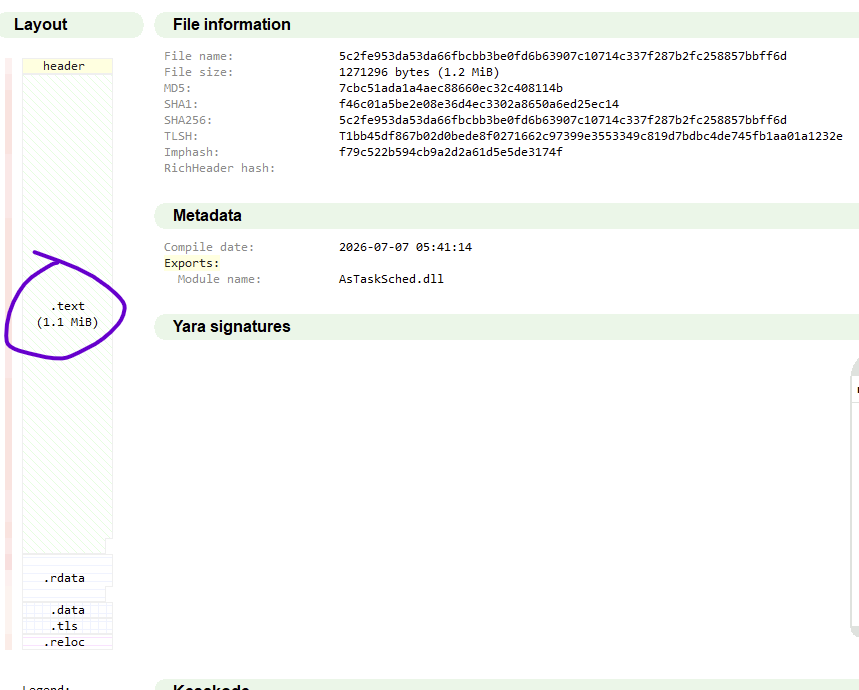
Stay on the Summary View, this time for the DLL. The section table is often more useful than any VirusTotal verdict:
| Section | Rights | Raw size | Entropy (0–255) |
|---|---|---|---|
.text | R-X | ~1.13 MB | high |
.rdata | R– | ~87 KB | low |
.data | RW- | ~6 KB | low |
.tls | RW- | 512 B | low |
.reloc | R– | ~19 KB | low |
Two things jump out.
- A
.textsection of just over a megabyte is absurd for something that claims to be a task-scheduler helper. A well-behaved little utility DLL sits somewhere between 30 KB and 300 KB of code. Ten times that means the code is not really code — it is code plus a lot of encrypted content living inside it. - The entropy of
.textis high. Compiled code has middling entropy; instructions are patterned. When the code section starts looking random, it is because someone has scattered encrypted data and heavy obfuscation through it.

4. Exports — the Disguised Entry Point
DLLs advertise their capabilities through exports. Open the Symbols list with F5 and this one shows exactly two:
_RegisterScheduledTask@12
_DeleteScheduleTask@4
Those are the names of the real ASUS AsTaskSched.dll. A legitimate, signed EXE that expects to load an ASUS-branded task-scheduler helper will call RegisterScheduledTask and go about its day. Feed it this DLL and the export name is unchanged, the calling convention is unchanged, everything looks exactly right — but on the other side of the export is a backdoor. That is DLL sideloading in one sentence: keep the signature and reputation of the host EXE, replace the DLL underneath, and let Windows do the trust-inheritance for you.
Keep the address of _RegisterScheduledTask@12 in your head. It is where the actual behaviour starts.

5. Imports — What Can It Actually Do?
The imported APIs are the quickest answer to “what is this thing?” They live in the Symbols list too. The interesting groups:
Network (winhttp.dll):
WinHttpOpen, WinHttpConnect, WinHttpOpenRequest, WinHttpSendRequest, WinHttpReceiveResponse, WinHttpQueryDataAvailable, WinHttpReadData, WinHttpCloseHandle — a full HTTP(S) client, both send and receive.
Host fingerprinting (iphlpapi.dll):
GetAdaptersInfo — enumerates the network adapters. In practice that means one thing: the MAC address, used as a stable per-host identifier.
Files (kernel32.dll):
CreateFileW/A, ReadFile, WriteFile, FindFirstFileExW, FindNextFileW, CreateDirectoryW/A, GetTempPathA — full read/write/search across the filesystem.
Control and stealth:
CreateMutexA (single instance), IsDebuggerPresent (self-explanatory), GetTickCount64, Sleep, TerminateProcess, and the classic pair LoadLibraryExW + GetProcAddress for resolving APIs at runtime.
The profile is already recognisable from the import table alone: HTTP-speaking backdoor, uniquely identifies its host, reads and writes files. Nothing here is a positive indicator on its own; taken together it is a downloader/uploader with an implant on top.

6. Strings — the Aha Moment
F6 opens the Strings View. Malcat does not just list strings; it scores each one from 0 to 255 by length, entropy, references, YARA hits, and a handful of other heuristics, and it tags them (URL, IP, PATH, BASE64, HEXA, USERAGENT, …). That last part is worth its weight — you can sort by tag and jump straight to the URLs.
Tip:
Ctrl+Fin the Strings view focuses the search box; double-click a string and Malcat jumps to the location in the binary that references it, which is exactly what you want when you get to section 9 and need to trace who consumes what.
Sorting through this DLL’s strings, the following stand out:
| String | Meaning |
|---|---|
api.telegram.org | C2 host — the Telegram bot API |
/bot · /send · POST | building blocks of the bot URL (/bot<TOKEN>/sendMessage, etc.) |
Content-Type: multipart/form-data; boundary= | how files get uploaded — hence exfiltration |
Mozilla/5.0 (Macintosh; Intel Mac OS X 10_5_8) … Chrome/13.0.748.0 Safari/534.31 | forged User-Agent |
A WinHTTP Example Program/1.0 | a second, considerably lazier User-Agent |
c:\programdata\shimgen_Data\shimgen.exe | the legitimate host EXE |
c:\programdata\shimgen_Data\AsTaskSched.dll | the malicious DLL — this file, on disk, in situ |
mscoree.dll | hints at .NET / CLR use somewhere in the chain |
tw8/6xxcAusTWEBbEkNBC/…lQ==…O2xoadH4LcVbp4MM | a fat, obviously non-random base64 blob |
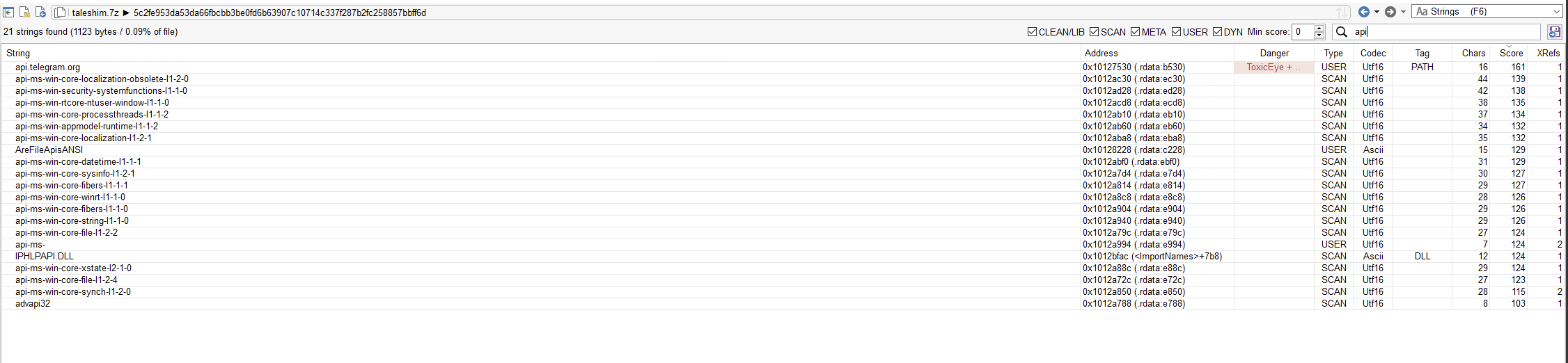

That is the entire premise of the sample laid out in one string list: Telegram as C2, a sideloading pair on disk, and an encrypted config sitting in plain sight. The rest of the analysis is really just the work of confirming these guesses at the code level.
7. What Malcat Says About the Obfuscation
The Summary View has an Anomalies panel — a list of things Malcat noticed while parsing the binary that it thinks a human should look at. For this sample the list reads like a textbook chapter on modern commodity obfuscation:
ImportByHash(severity 4): APIs get resolved by hash instead of by name. A first glance at the import table underreports what the binary actually calls at runtime.XorInLoop(486 hits): XORs inside loops, in bulk. Classic pattern for string and data decryption on demand.ManyHighValueImmediates/ManyUniqueImmediateBytes(hundreds each) plusSpaghettiFunction: the fingerprint of mixed boolean arithmetic (MBA) and control-flow flattening. Arithmetic and jump salad that inflates the code and changes exactly nothing about what it does.StackArrayInitialisationX86: strings and data assembled byte by byte on the stack instead of sitting as constants in the binary. Stack strings.BigBufferNoXrefMediumToHighEntropy: large, high-entropy blobs with no obvious cross-references. Your encrypted payloads and config live in one of those.

Any one of these on its own is not damning. All of them together is not something a benign DLL ever wears. Import-by-hash, plus XOR loops, plus MBA, plus stack strings — that combination is basically an obfuscator’s signature. You can find the toolchain from the anomalies list before you have read a single line of code.
8. From the Export to the Payload
Time to read code. Double-click _RegisterScheduledTask@12 and Malcat drops you at the export in the Disassembly View. Hit F4 for the decompiler to get from x86 into readable pseudo-C.
_RegisterScheduledTask is a doorman:
undefined4 _RegisterScheduledTask@12(void) {
    sub_1006cce0();   // the actual payload
    return 0;
}
The harmless-looking export delegates straight to sub_1006cce0. That is the sideloading trick in code form — the signed host EXE calls a name it trusts, the DLL turns the call around into whatever it actually wants to run.
Inside sub_1006cce0 the startup logic falls out as:
Anti-analysis first. A
GetTickCount64-based timing trick, a handful of pointlessuser32calls sitting there as bait, and a check that ends inTerminateProcess(GetCurrentProcess(), -1);The moment the DLL suspects a sandbox or debugger it kills itself. Not the loudest fingerprint, but a very deliberate one.
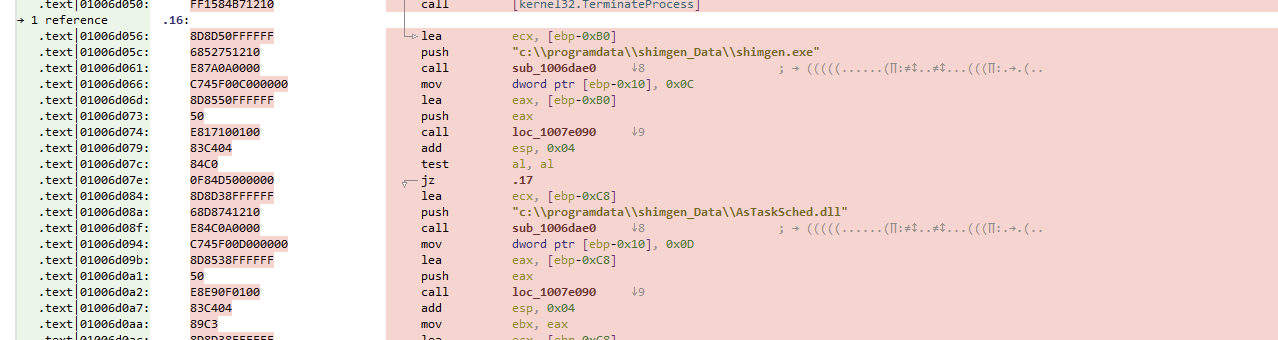
Verify the sideloading nest. It checks the paths
c:\programdata\shimgen_Data\shimgen.exeand…\AsTaskSched.dll— either creating its own home or confirming it is running from the right one. Sideloading only works if the two files sit next to each other, so the malware makes sure.
Decrypt the config via
sub_1006c370. That is section 9.Main loop. After that it enters an MBA-obfuscated forever loop with
Sleep(1000)between iterations, walking a table at0x1013540c— the command dispatcher we come back to in section 10.
Tips:
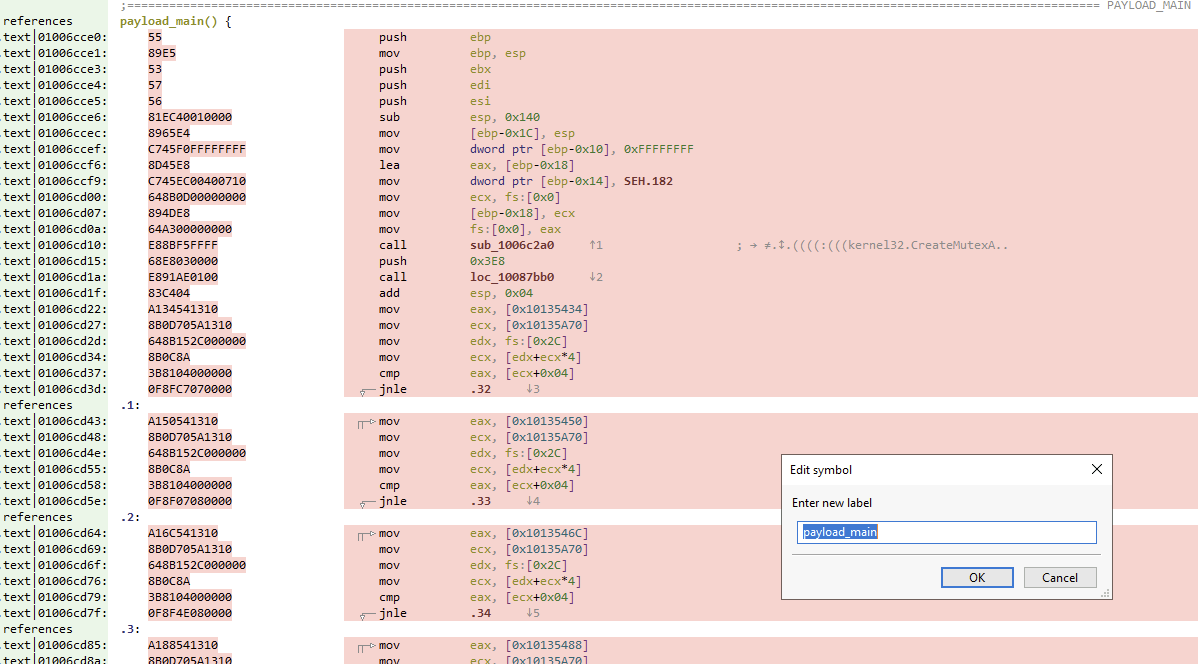
xon any function name jumps through cross-references. Use it constantly. Every question of the shape “who uses this?” is onexaway.nrenames symbols. Givesub_1006cce0the namepayload_mainand every future call site prints legibly.
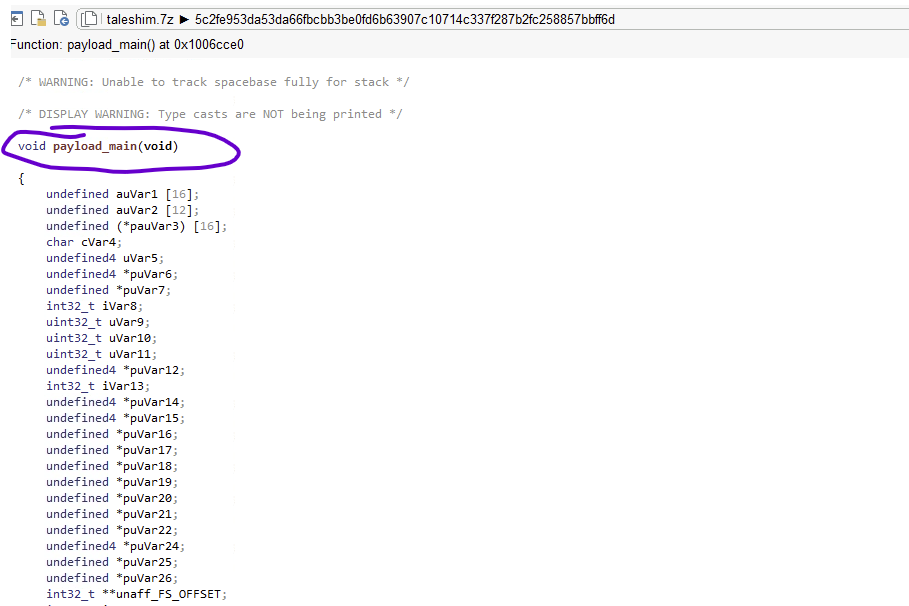
9. Cracking the Config
The Base64 blob from section 6 is the piece of the binary that carries the operator’s identity: bot token and chat ID. There is a general shape to breaking this kind of config, and it is worth memorising because you will use it on every encrypted config, not just this one:
String → who reads it → the decode function → where is the key → who builds the key → the key bytes → decrypt.
Six steps. That’s it.
Step 1 — start at the string, ask who uses it
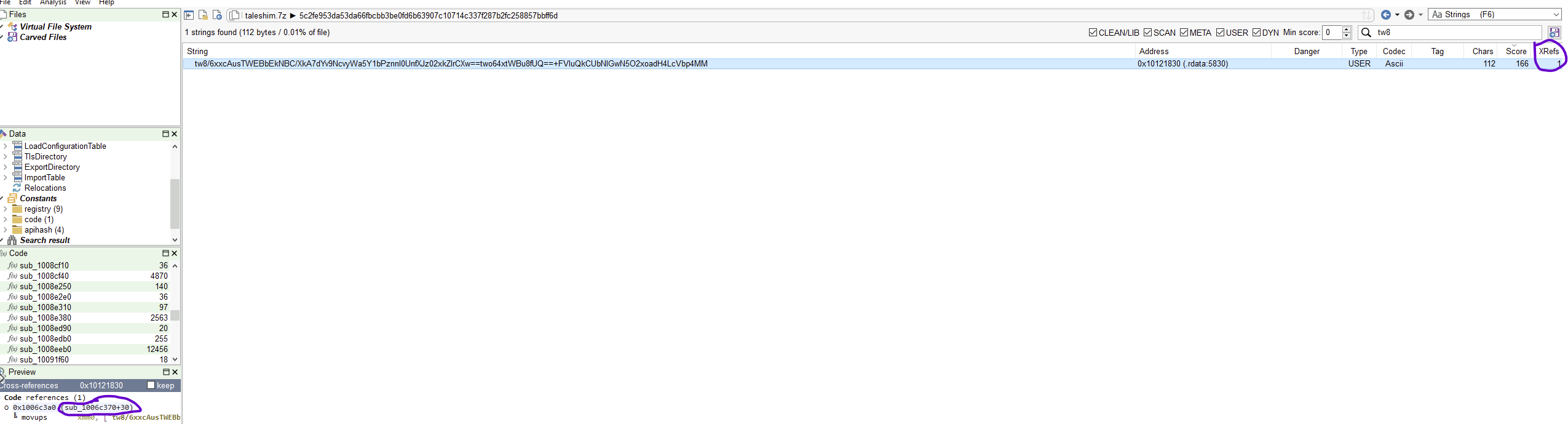
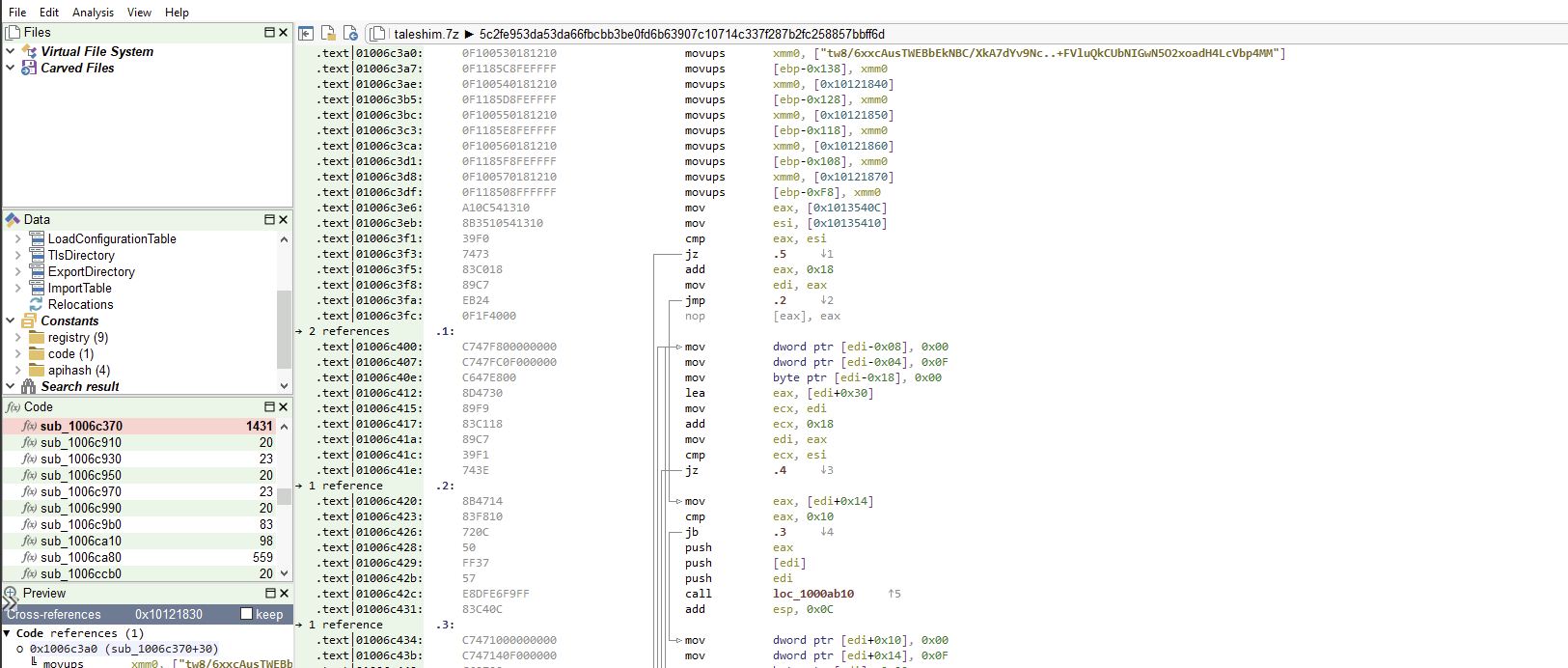
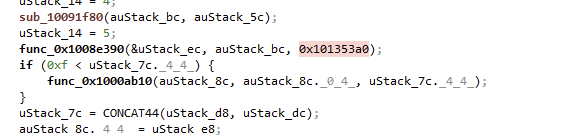
In the Strings View (F6), search for tw8/6xxc…4MM. Malcat says exactly one function references it: sub_1006c370. Double-click the reference and you land inside that function.
Step 2 — read the caller
F4 for the decompiler. Inside sub_1006c370 the pattern is unusually legible:
uStack_13c = "tw8/6xxc…4MM";                          // (1) the blob is loaded
...
sub_10091f80(auStack_bc, ...);                        // (2) preprocessing
func_1008e390(&uStack_ec, auStack_bc, 0x101353a0);    // (3) the decode function
...                                                   // (4) result stored in config vector 0x10135410
Line (3) is the decrypt call: it is the last thing that runs before the result gets stored in the config array. Two useful observations:
- The third argument,
0x101353a0, is a fixed address. A hard-coded address passed as a parameter is almost always a key or a table. - There are two decode calls in this function — the config has two values.
Step 3 — jump into the decode function
The decompiler prints the call as func_0x1008e390(...). The 0x prefix is Malcat’s way of saying “raw address, not a registered symbol” — pressing Enter on it does nothing. The reliable way in is Goto:
Ctrl+G→1008e390→ Enter.
Once you are inside, Malcat labels the function sub_1008e380 — the function actually starts 16 bytes before the call target, with a short prologue in between. Tick “Hide casts” in the decompiler and it becomes almost readable.
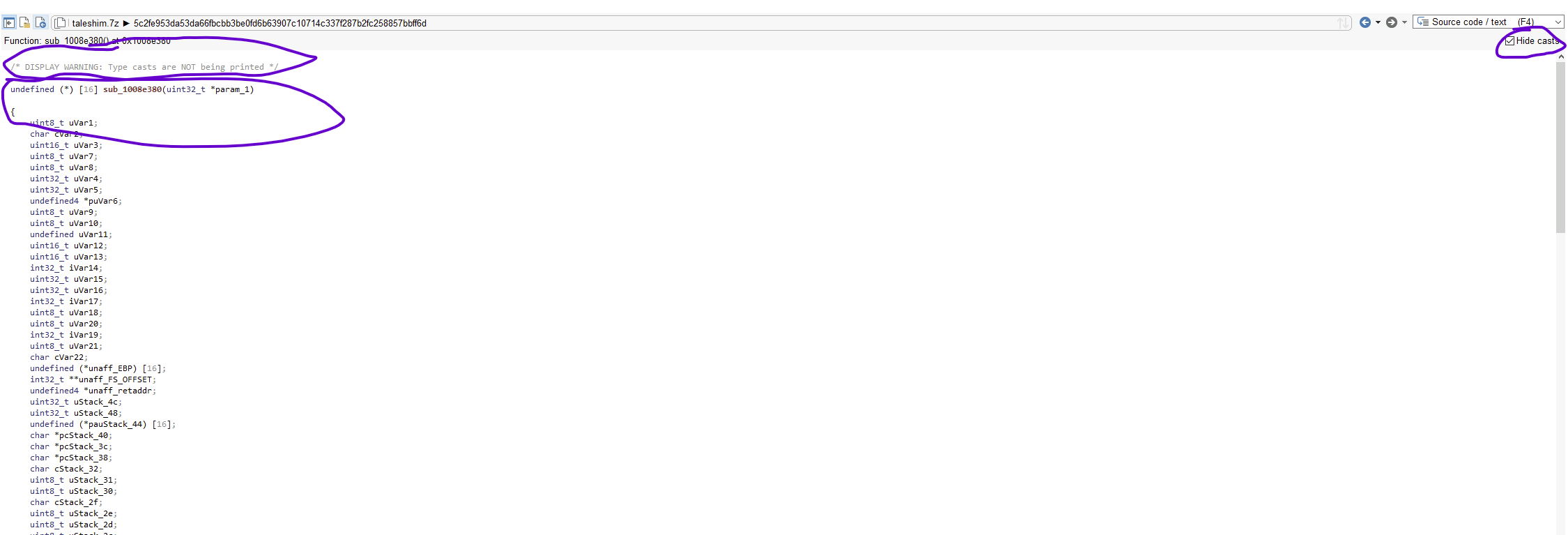
You do not need to understand the whole mess. Three lines matter:
- The loop driven by the input length:(
while (uVar4 < unaff_retaddr[4]) { // uVar4 = counter, unaff_retaddr[4] = input lengthunaff_retaddris the input string in this decompilation.) - Input byte and key byte, right at the top of the loop:That
uVar7 = *(puVar6 + uVar4); // input[i] uVar8 = *(*param_1 + uVar4 % uStack_48); // key[i % keylen]% uStack_48is the giveaway: the key repeats, cycling through its length. Circular key. - The output byte, appended at the end of the loop:
cStack_32 = …;                             // = uVar7 XOR uVar8 (net effect)
*pcStack_3c = cStack_32;                   // append to output
Everything else between (2) and (3) is arithmetic and control-flow noise. Working hypothesis: circular XOR. The XorInLoop anomaly from section 7 says the same thing. We validate the hypothesis at the end of this section — if the output looks like text, we were right.
Step 4 — find the key
Back one level (Backspace) to sub_1006c370, copy the address 0x101353a0. Then in the Disassembly View (F3), Ctrl+G to jump to it.
Malcat plants the cursor somewhere inside .data, but the address bar reads something odd — .data|0101337ff — and the content is nothing. Zeroes. In the disassembler you get a wall of add [eax], al.
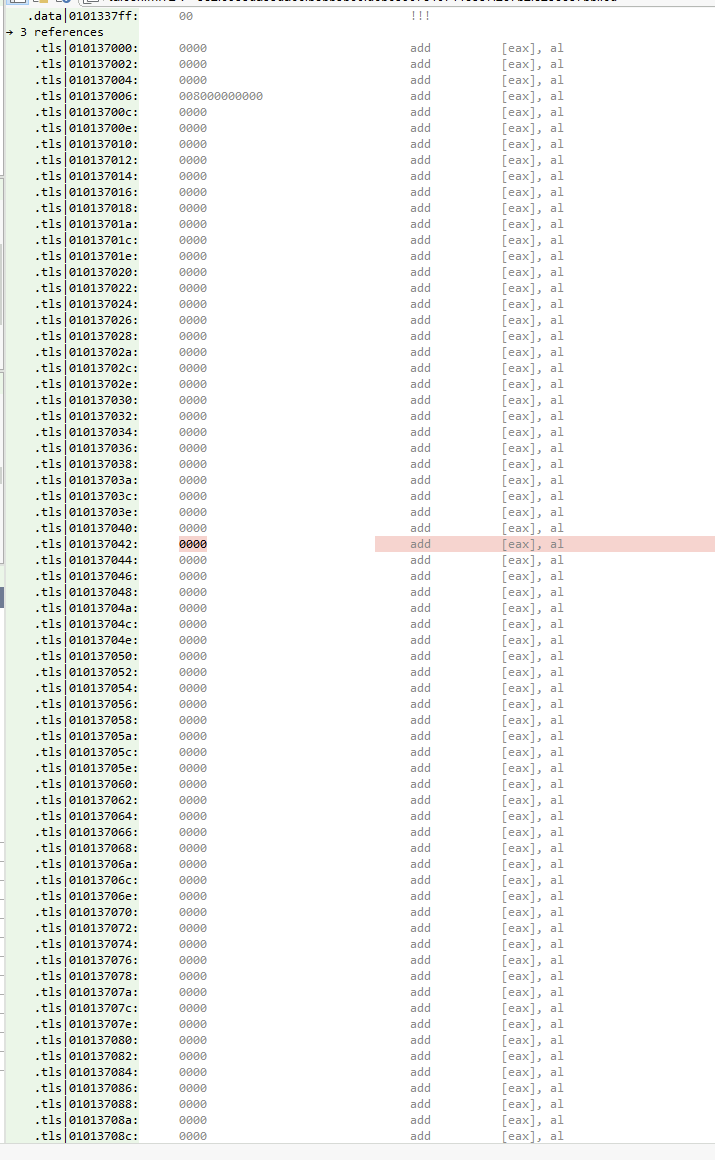
Why the mismatch?
0x101353a0lives in the bss half of.data— the uninitialised region that does not exist on disk at all (zero file bytes; the OS zeroes it out when the module loads). Because there is no file offset to show, Malcat falls back to the nearest real one (.data|0101337ff) and prints zeroes for the payload. That is the finding: a key that is empty on disk has to be populated by code at runtime. So we hunt the code that populates it.
About the wall of
add: the disassembler is not lying — it is faithfully decoding00 00bytes asadd byte ptr [eax], al. Do not read them; the point of being here is to grab cross-references.
Same trick as step 1, only for the key: back to sub_1006c370, click on 0x101353a0, open Cross-references. You get two kinds of hits:
sub_10072ac0— writes to the address (callsoperator newand memcpies from0x10121280). This is our initialiser.
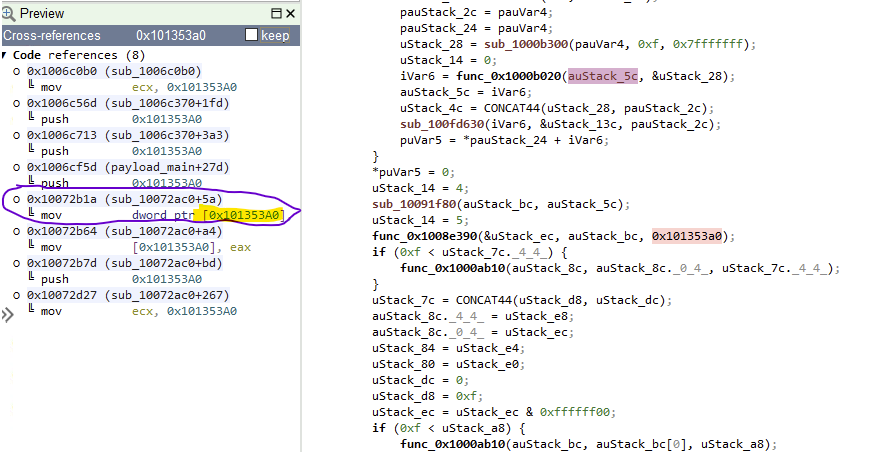
Square brackets on the left of a
mov= write = producer. No brackets = just passing the address = consumer. Two symbols; a habit worth building.
Double-click one of the write lines (sub_10072ac0+5a) and you drop into sub_10072ac0.
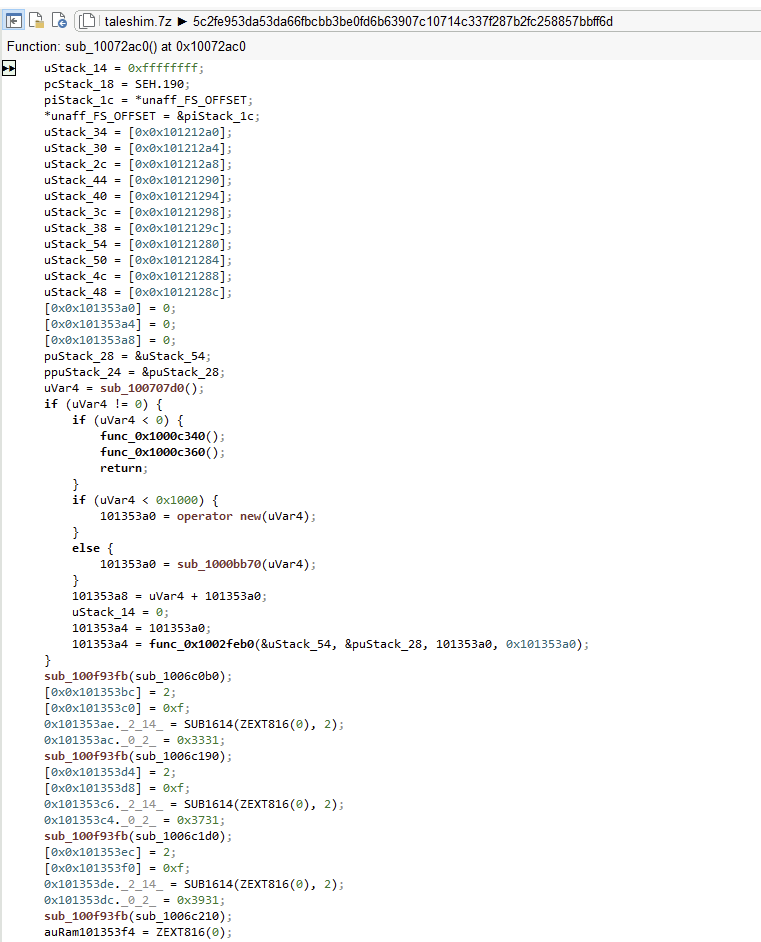
Step 5 — read the initialiser, harvest the key bytes
The start of the function is unspectacular:
...
uStack_54 = [0x10121280];         // block of static bytes gets
uStack_50 = [0x10121284];         // copied into a local buffer …
...
101353a4 = operator new(uVar4);   // memory allocated for the key
… = func_…(&uStack_54, …, 0x101353a0);   // and copied in
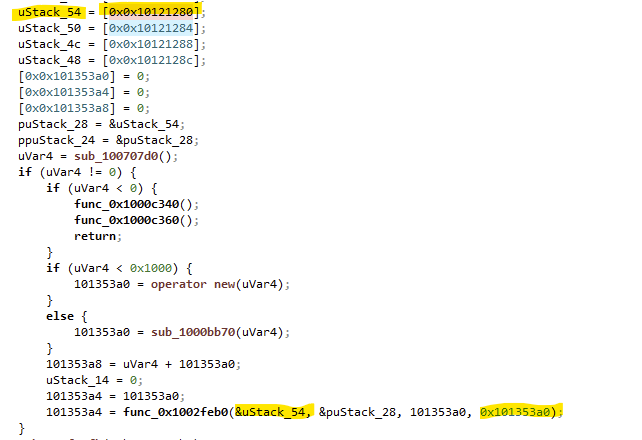
The key is copied byte for byte from 0x10121280, and that address lives in .rdata — meaning it is in the file on disk, and it is readable. Double-click the address, read forward to the first null byte, and out fall 44 bytes:

8F380CDA296F34DE27697A1A53051849B69D59E528D7E669F17CF8D3CF220B66
96DA776534401C8A0F0C31C6
That is the key. Ding.
Step 6 — back to the blob, decrypt in the Transform panel
Back to F6, find the blob string again:

The Transform panel gets you the rest: operators on the left, chain in the middle, live output on the right (green = ok, red = error).
One trap you will hit if you skip this: the blob is two base64 strings concatenated. The == at position 64 is padding, which is the end of chunk 1. Each chunk has to be decoded on its own, and the circular XOR restarts at key index 0 for each chunk.
Per chunk the chain is base64 decode → xor8. Watch the operator name — xor8 is “circular XOR with a byte-key of arbitrary length”; the plain xor operator takes only a single byte and will happily hand you garbage. Set the key field to hex and paste the 44 bytes.
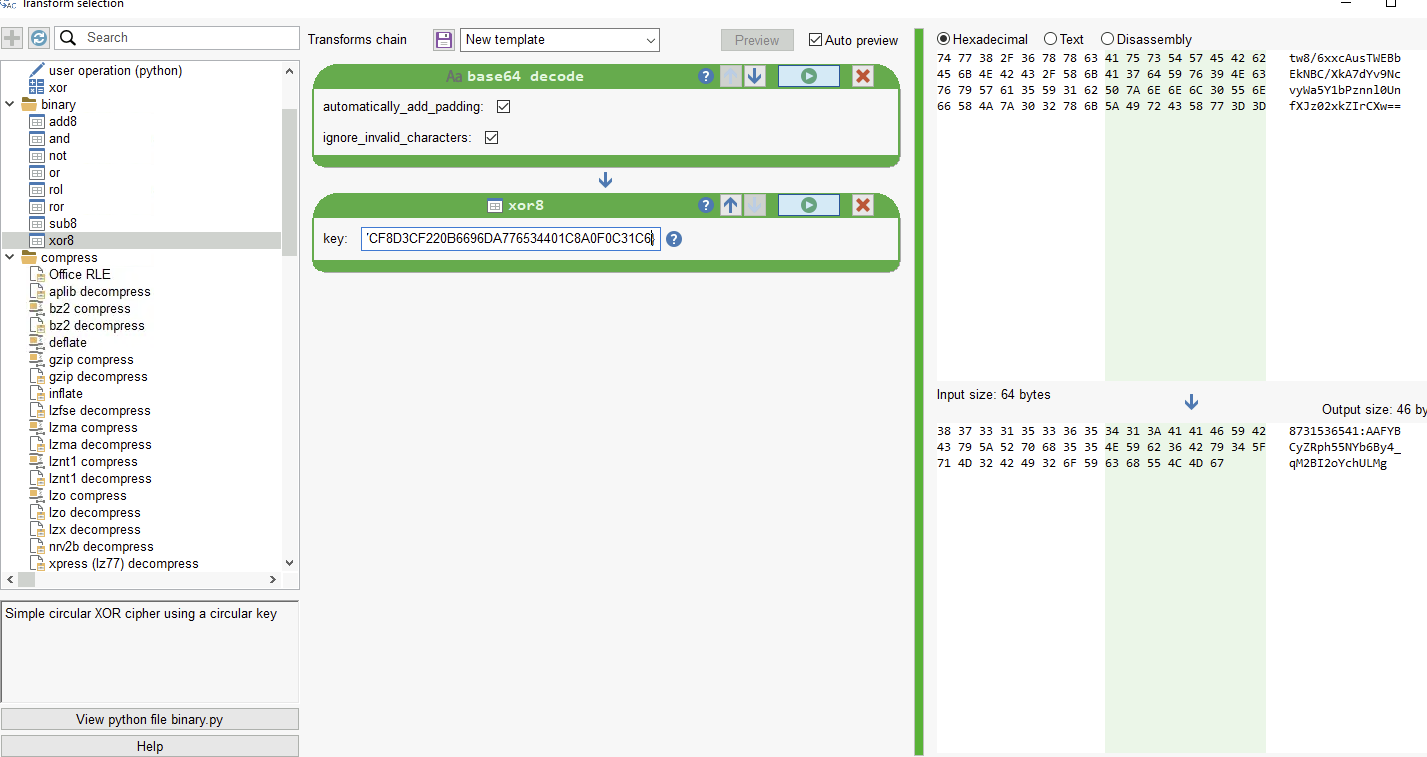
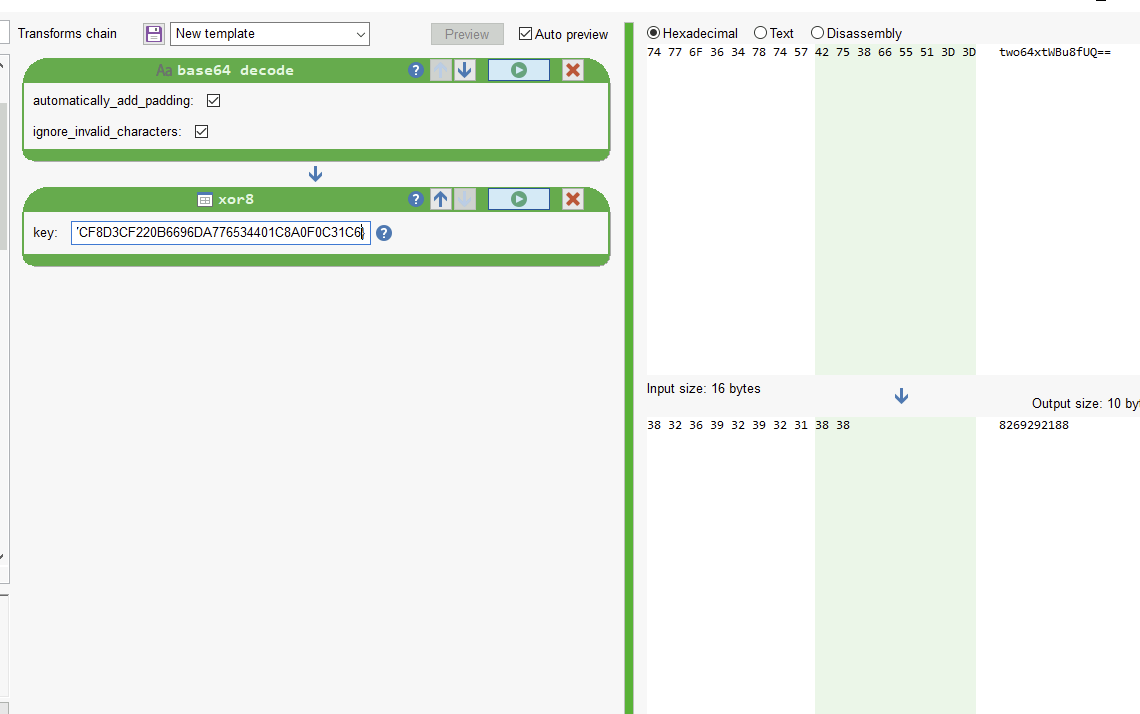
Shortcut: in the Transform panel, “In place” rewrites the bytes in the current binary; “New file” opens the decoded result as its own fresh analysis, which is what you want if the output is a second-stage payload.
| Chunk | Base64 (input) | Chain | Cleartext |
|---|---|---|---|
| 1 (chars 0–63) | tw8/…ZIrCXw== | base64 decode → xor8 (key) | 8731536541:AAFYBCyZRph55NYb6By4_qM2BI2oYchULMg |
| 2 (chars 64–79) | two64xtWBu64UQ== | base64 decode → xor8 (key) | 8269292188 |
Chunk 1 is a 46-character Telegram bot token (<bot_id>:<token>), chunk 2 the 10-digit chat ID. Both come out as readable text — which, retroactively, confirms the circular-XOR hypothesis from step 3.
From here on the DLL builds its Telegram URL as
"/bot" + param_1 + "/send" + param_4 → /bot<TOKEN>/send<METHOD>
param_1 is the token (from the config), param_4 is the method — passed in by the caller. sub_100071a0 (the sender) has no static callers at all: no call, no address reference. It is reached indirectly, which fits the ImportByHash anomaly like a glove — the malware resolves its own internal targets the same way it resolves its imports.
https://api.telegram.org/bot8731536541:AAFYBCyZRph55NYb6By4_qM2BI2oYchULMg/send<METHOD>
And the Content-Type: multipart/form-data; boundary=… header sitting next to this code path in .rdata is a strong hint that at least one of those <METHOD> slots is sendDocument.
10. The Telegram C2 Channel
Same technique, one string over. Double-click api.telegram.org, follow the cross-references, and you end up in sub_100071a0. That is the C2 sender. Its decompilation is a monster — north of 50 KB of pseudo-C, most of it MBA — and you will not read it line by line. You do not have to. The APIs it imports and the strings around it tell most of the story:
- Connection is set up via
WinHttpOpen/WinHttpConnecttoapi.telegram.org. The C2 function is the one that uses theA WinHTTP Example Program/1.0User-Agent, which is what happens when a professional attacker forgets to change the sample string from the MSDN example. - Path is
/bot<TOKEN>/send<METHOD>from section 9. Token =param_1, method =param_4, both handed in by the (indirect) caller. - Request method is
POST,Content-Type: multipart/form-data; boundary=<global string>. Body fields arrive asparam_2andparam_3. - Host identity is a MAC address via
GetAdaptersInfo.
Receiving commands. There is a matching GET polling path on the other side. Responses come back as JSON, and the command codes "13", "17", "19" are built in sub_10072ac0 (yes, the same initialiser from section 9.4) as tiny stack strings:
0x101353ac = 0x3331;   // bytes 31 33  -> "13"
0x101353c4 = 0x3731;   // bytes 31 37  -> "17"
0x101353dc = 0x3931;   // bytes 31 39  -> "19"
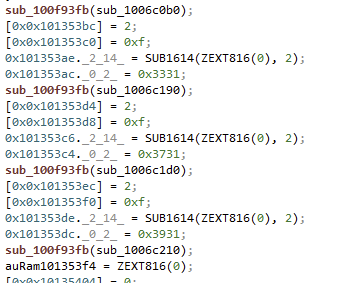
To find the GET side, back to the strings and search for a User-Agent.
A hard-coded fake browser User-Agent in a DLL is always suspicious, and it only gets set when an HTTP connection is being built. Follow the User-Agent and you find the HTTP client that owns it.

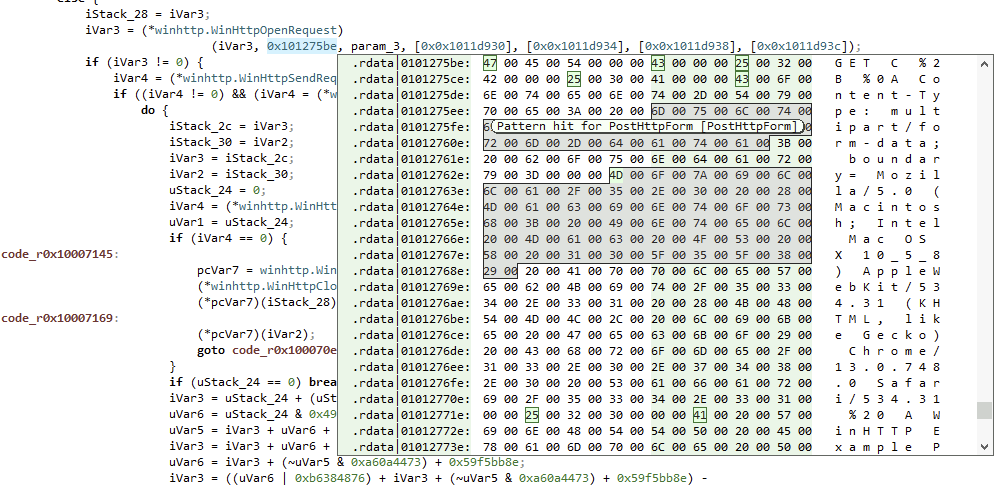
Look at both callers. In the decompiler (F4), sub_10006d10 uses WinHttpSendRequest and the second argument — the verb string — is GET. That’s the GET client.
Now, who calls the GET client? Cross-references again.
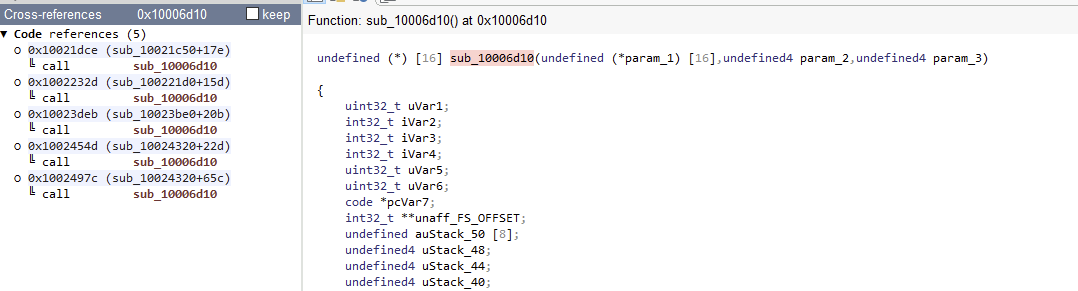
sub_10024320 is the interesting one: it calls the GET client twice inside its own body. That is the shape of a poller. Something that runs WinHttp…(GET) → parse → Sleep(…) → repeat. Jump into sub_10024320 in the decompiler and search for Sleep.
A long-poll loop always looks the same: build a GET, send it, read the response, sleep, go back to the top.
The encrypted path fragments for the URL live in .rdata around the 0x1011e… neighbourhood. Search inside sub_10024320 for these three lines:
… = 0x1011e01b; …; sub_10063a10();
… = 0x1011e049; …; sub_10063ae0();
… = 0x1011e127; …; sub_10063e80();
Each pair is a URL fragment plus its decoder. They are all built the same way; do one and you can do all three. Double-click sub_10063e80.
param_2 is the encrypted blob; param_1 is the output buffer. The magic number is 0x13 (decimal 19) — the first 19 bytes of the blob are the key, and the remaining bytes are XORed against it in a repeating cycle.
undefined4 sub_10063e80(int32_t param_1, int32_t param_2)
{
    int32_t iVar1;
    uint32_t uStack_24;
    uint32_t uStack_20;

    iVar1 = [0x0x10133fa0];
    uStack_24 = 0x5626f3ad;
    while (true) {
        while (uStack_24 < 0x74c1697b) {
            uStack_24 = 0x7636aef5;
            uStack_20 = 0;
            if (iVar1 == 1) { uStack_24 = 0x7f8b5421; }
        }
        if (0x7e27099c < uStack_24) break;
        if (uStack_24 < 0x78aed386) {
            *(uint8_t *)(param_1 + uStack_20) =
                *(uint8_t *)(param_2 + 0x13 + uStack_20) ^ *(uint8_t *)(param_2 + uStack_20 % 0x13);
            uStack_20 = uStack_20 + 1;
            uStack_24 = 0x7636aef5;
            if (uStack_20 == 0x13) { uStack_24 = 0x7984bde9; }
        } else {
            [0x0x10133fa0] = 1;
            uStack_24 = 0x7f8b5421;
        }
    }
    return 0x88d6bdcd;
}
If you strip out the state-machine dressing (uStack_24 cycling through random-looking magic numbers is the control-flow flattening tax), what is left is a two-line XOR loop. The magic numbers are decoration; do not follow them.
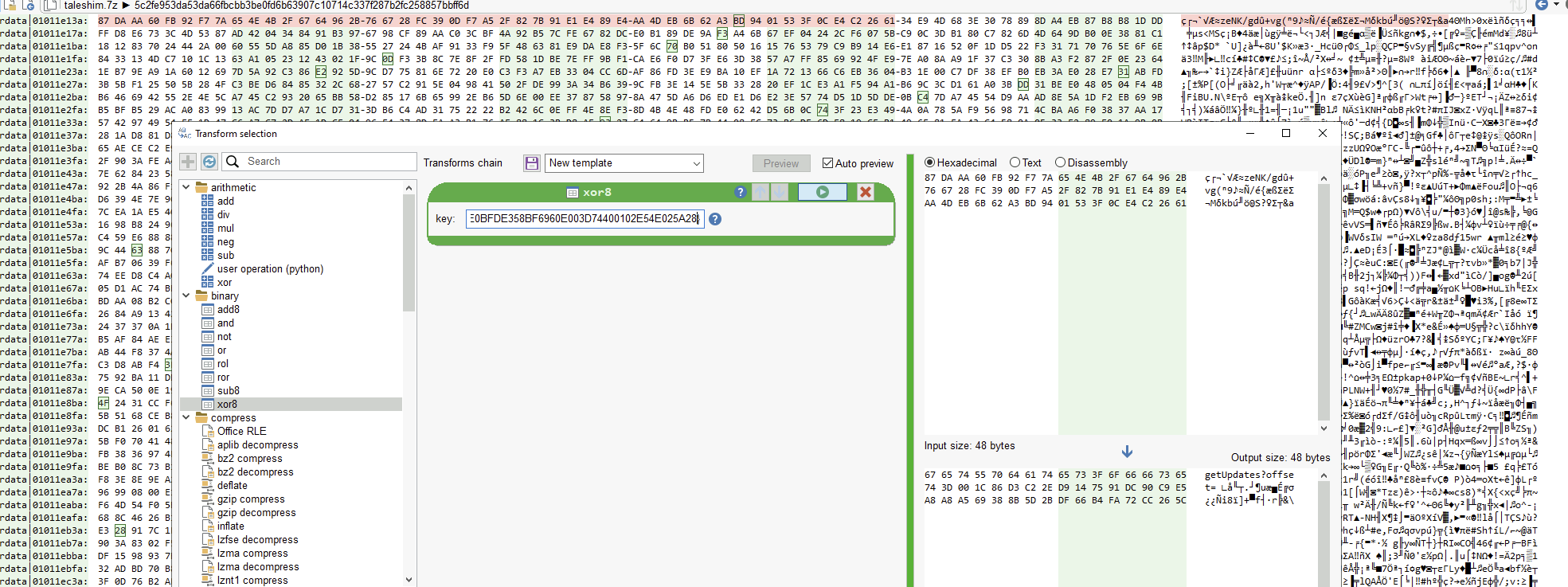
Jump to 0x1011e127. The first 19 bytes there are the key: E0BFDE358BF6960E003D74400102E54E025A28. The ciphertext starts 19 bytes later, at 0x1011e13a. Highlight the next ~30 bytes, open Transforms, add xor8, set the key field to hex, paste E0BFDE358BF6960E003D74400102E54E025A28.
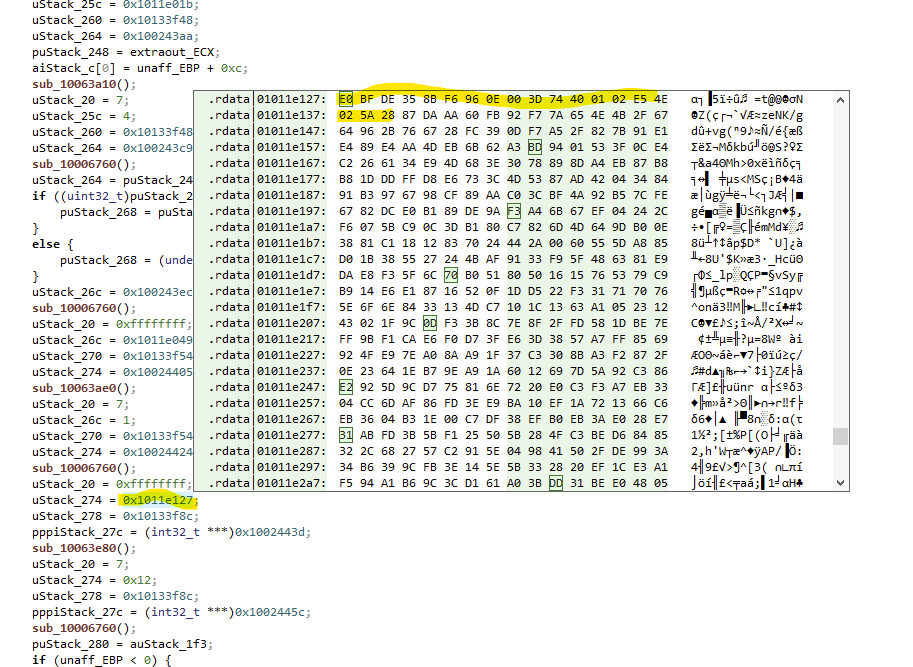
Out comes getUpdates?offset=. Do the other two blobs the same way and the full picture snaps into place.
Putting the transport together end to end:
Transport. There are multiple WinHTTP helpers. sub_10006d10 is the GET client (verb string at 0x101275be, forged Chrome User-Agent). sub_100071a0 and sub_10004c60 are POST multipart clients. Both User-Agents (Mozilla/5.0 (Macintosh …) Chrome/13… and A WinHTTP Example Program/1.0) live in the binary and are picked up by different helpers.
Endpoints (GET, assembled from /bot + token + method):
| Endpoint | Purpose | Function |
|---|---|---|
getUpdates?offset= | pull new commands (long-poll) | sub_10024320 |
sendMessage?chat_id= + &text= | text reply / bot registration | sub_10023be0 |
sendPhoto?chat_id= | send screenshot | — |
/getFile?file_id= | download metadata (→ file_path, file_size) | sub_100221d0 |
Sending big data. POST sendDocument, Content-Type: multipart/form-data; boundary=----WebKitFormBoundary7MA4YWxkTrZu0g, body fields Content-Disposition: form-data; name="chat_id", filename=", Content-Type:. The error string Failed to read file! shows up when the upload path fails to open its source.
Response parsing. JSON is parsed with nlohmann::json (verified from the RTTI names, .?AVparse_error@…@nlohmann@@). Decoded field names: ok, result, error_code, message, date, chat, id, text, caption, document, file_id, file_name, file_path, file_size.
Runtime loop.
- Poll
getUpdates?offset=N. - From each update
message:text= shell command to execute (type 1);caption+document.file_id= download the attached file and execute it (type 2). Registration is command code"13"; the codes"13","17","19"come fromsub_10072ac0. - Ship the result back via
sendMessage(text) orsendDocument(file), addressed bychat_id.
11. What This Sample Actually Is
Rolled up, and separating what is verified in this walkthrough from what is only strongly implied by the strings:
Verified.
- Delivery. 32-bit Windows DLL exporting
_RegisterScheduledTask@12and_DeleteScheduleTask@4. Sideloaded throughc:\programdata\shimgen_Data\shimgen.exe, both paths present in.rdata. - Config. One base64 blob in
.rdata, split at the==padding into two chunks. Each chunk decrypts withbase64 → circular XOR (44-byte hex key). Chunk 1 is a Telegram bot token, chunk 2 is a chat ID. Key bytes originate at0x10121280, copied at runtime bysub_10072ac0into an allocation whose pointer lives at0x101353a0. - Obfuscation. Import-by-hash, mixed boolean arithmetic, control-flow flattening, stack-string construction, XOR-decrypted strings and URL fragments. All flagged by Malcat’s Anomalies list before a single line of code was read.
- C2 transport. WinHTTP,
api.telegram.org. Multiple helpers: a Chrome-user-agent GET poller (sub_10006d10, driven bysub_10024320), an “A WinHTTP Example Program/1.0” POST multipart sender (sub_100071a0), plus supporting helpers for message and file exchange. - C2 protocol. Long-poll
getUpdatesfor commands, reply withsendMessage/sendDocument, download attachments via/getFile. JSON responses parsed withnlohmann::json. Command codes"13","17","19"built as stack strings insub_10072ac0. - Anti-analysis.
IsDebuggerPresent, timing check viaGetTickCount64, decoyuser32calls,TerminateProcess(GetCurrentProcess(), -1)on detection. - Host identity.
GetAdaptersInfo— MAC address used as a stable bot ID.
Implied by strings, not chased through the code here.
mscoree.dllsuggests a .NET stage somewhere in the delivery chain — probably howshimgen.exeis dropped or invoked, but not analysed in this post.- The command code
"17"and"19"handlers are wired up but the exact operator vocabulary (which one is “download and run”, which is “shell exec”, which is “screenshot”) is left as an exercise. Cross-referencing them from the main dispatcher gets you there.
There is not really any elegant obfuscation here. There is a heavy obfuscator that puffs the binary up ten times its useful size, a config format that survives about as long as it takes to press Ctrl+F on .rdata, a User-Agent left over from a Microsoft sample program, and a full end-to-end C2 channel routed through a messaging platform the operator does not own. The Telegram bot API does most of the work: reliable delivery, TLS on somebody else’s dollar, a familiar destination that no proxy is going to flag. The malware writer’s job is basically to POST and to GET.
Once you have the token, the chat ID, and the endpoint map, the C2 is not really the malware’s anymore — it is yours, if you want it. Telegram forwards messages to whoever holds the credentials. It does not distinguish between the intended reader and the analyst who pulled the credentials out of .rdata an hour later. Whether you use that fact is a separate conversation, but the sample makes it available.
Hashes for your IOC table.
Sample (AsTaskSched.dll, 32-bit):
  SHA-256  5c2fe953da53da66fbcbb3be0fd6b63907c10714c337f287b2fc258857bbff6d
(The 7z that I received the sample in is a transit wrapper, not an attacker artefact — its hash is not an IOC.)
Paths on disk: c:\programdata\shimgen_Data\shimgen.exe, c:\programdata\shimgen_Data\AsTaskSched.dll. If you spot either of those on a host that has no business running an ASUS toolchain, that host has a Telegram problem.